When someone searches "paediatrician near me" or "orthopaedic doctor in Baner", Google shows a map and three listings before any website. Most of those patients never scroll further. Local SEO for doctors is the work of getting into those three listings for the searches that matter to your practice, and making the listing good enough that the patient calls.
This guide explains how Google decides who appears, how to set up profiles for doctors, clinics and hospitals, and how to stay inside both Google's rules and the NMC's 2026 advertising guidelines. For the website side of SEO, see our SEO guide for doctors.
How Google decides who appears
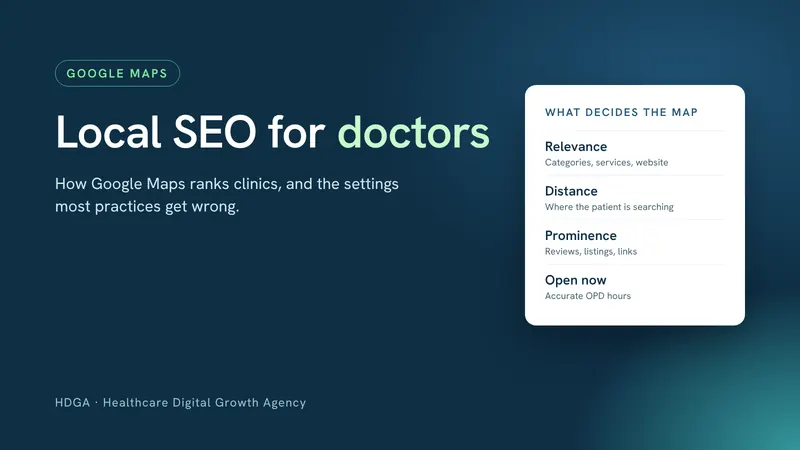
Google says local results are based mainly on three things:
- Relevance: how well your profile matches what the person searched for.
- Distance: how far your clinic is from the searcher, or from the area named in the search.
- Prominence: how well known and trusted your practice is, judged from reviews, links, articles and directory listings.
You cannot change distance, so local SEO is about the other two. The 2026 Local Search Ranking Factors survey of local search specialists ranks these as the most important factors for Google Maps:
- Primary Google Business Profile category
- Distance from the searcher
- Keywords in the business name
- A physical address in the city searched
- Being open at the time of the search
- High Google ratings
- A visible address, rather than a service-area-only profile
- Additional categories
- Number of Google reviews with text
- Correct placement of the map pin
Several of these are simple settings that many practices get wrong.
Step 1: Choose the right profile setup
Doctors, clinics and hospitals each need a different setup:
- A doctor practising alone: one profile that combines the practice and the doctor, for example "Sunrise Child Clinic: Dr Anil Mehta". Google recommends this for solo practitioners.
- A clinic with several doctors: one profile for the clinic, plus a separate profile for each doctor who sees patients there and whom patients ask for by name. Each doctor's profile should link to their own page on your website.
- A hospital: one profile for the hospital, and separate profiles for public-facing departments with their own entrance, hours or phone number, such as the emergency department, a diagnostic centre or a maternity wing. Each department's name must be different from the hospital's and from other departments'.
- A clinic chain: one profile per branch, each verified at its real address, each with its own phone number and page on your website.
Before you start, search Google Maps for your clinic and every doctor's name. Old or duplicate profiles are common, especially for doctors who have moved, and they split reviews and confuse patients.
Step 2: Use your real name, exactly
Your profile name must be your real-world name as patients see it on your signboard and registration. Do not add keywords, locations or claims. "Best Cardiologist Andheri Dr Shah Heart Clinic" breaks Google's guidelines and can get the profile suspended. It is also the kind of superiority claim the NMC's 2026 guidelines prohibit.
Keywords in the name do help ranking, which is why people stuff them in. The legitimate version is a real name that already says what you do, such as "Andheri Heart Clinic", registered under that name with the same name on the signboard. Our Clinical Establishment Act registration guide explains why the registered name should match everywhere.
Step 3: Get the categories right
The primary category is the strongest single ranking factor. Choose the most specific category that describes the whole practice: Pediatrician, Cardiologist, Dermatologist, Orthopedic surgeon, Medical clinic, Hospital and so on. Add secondary categories for other services you genuinely offer.
Check which categories the practices that rank above you use. If they are listed as "Fertility clinic" and you are listed as "Medical clinic", you are competing with one hand tied.
Step 4: Fix address, pin and hours
- Use your full address as on your registration, and drag the map pin to your actual entrance.
- Set opening hours exactly, OPD timings for clinics, and 24 hours only for departments that are genuinely open round the clock. Being open at the time of search affects ranking, and patients who arrive at a closed clinic do not come back.
- Add special hours for holidays before each festival.
Step 5: Complete everything else
- Services: list each service or treatment, with factual descriptions and fees where you can.
- Description: what the practice offers, factually, with no superlatives, guarantees or offers.
- Photos: the entrance, so patients can find it, the reception, consultation rooms and equipment. No identifiable patients.
- Booking: a booking link, WhatsApp or phone number that is answered.
- Posts: news about timings, new services or health information. NMC's 2026 guidelines require a doctor's name, qualifications and registration number on electronic posts, so include them.
Step 6: Earn reviews within the rules
Reviews are among the most important ranking factors, and they are what patients read before calling. Two sets of rules apply:
- Google prohibits fake reviews, reviews in exchange for anything, and asking only satisfied patients (known as review gating).
- The NMC's 2026 guidelines prohibit fake or paid reviews, and doctors may not request or share reviews to promote themselves on social media.
In practice, let patients review you on their own, avoid review-request campaigns until the NMC clarifies the rule, and never repost reviews. See our guide to Google reviews under NMC 2026. Reply to every review, positive or negative, without confirming that the person was a patient or discussing their care. Our guide to the NMC testimonial rules covers the details.
Step 7: Back it up on your website
Your profile ranks better when your website confirms it:
- a page for each location, with the same name, address, phone and hours as the profile
- a page for each doctor, with qualifications, registration number, specialty and OPD timings
- structured data marking each page as a medical clinic, hospital or physician, with the address and hours
- clear answers to the questions patients ask. Google retired profile questions and answers in late 2025, and Maps now builds AI answers from your website, profile and reviews.
Step 8: Keep listings consistent
Practo, Justdial, Lybrate, hospital directories and insurance network lists should all show the same name, address, phone and hours. Inconsistent listings weaken prominence and send patients to old numbers. Update them all whenever anything changes.
Mistakes that cost rankings
- Keywords or claims stuffed into the profile name
- A virtual office or a relative's home used as the address
- Duplicate profiles for the same clinic, or old profiles for doctors who have left
- Wrong categories, or a generic category when a specific one exists
- Hours left at default, or "open 24 hours" when you are not
- Buying reviews, offering discounts for reviews, or asking only happy patients
How to measure it
Use the performance report in your Google Business Profile for calls, direction requests, website clicks and bookings each month. Track your position for your main searches from a few points around your clinic, because results change with the searcher's location. And ask every new patient how they found you, because local SEO only matters if it brings appointments.
Common questions
How long does local SEO take for a doctor?
Fixing categories, hours and the profile name can change rankings within weeks. Building reviews and prominence takes several months of steady work.
Should every doctor have their own Google profile?
Doctors who see patients regularly at the location and whom patients ask for by name can have their own profile. Solo doctors should combine practice and doctor in one profile.
Can I rank in a neighbourhood where I do not have a clinic?
Rarely. Distance is a core factor, and Google requires a real address for clinics that patients visit. Opening a branch, not creating a fake address, is the only legitimate way.
Do I need a website for local SEO?
A profile can rank on its own, but a website with location and doctor pages strengthens it, and it is where patients and AI tools check the details.
What to do next
This week: check your profile name, primary category, hours and map pin, and search Maps for duplicate profiles. Those four fixes alone often move a practice up the map. If you would like it handled for you, see our Google Business Profile management service, or book a call.
Sources
- Google Business Profile Help: how local results are ranked
- Google Business Profile Help: guidelines for representing your business
- Whitespark: 2026 Local Search Ranking Factors
- Whitespark: with Google Q&A gone, you need an Ask Maps strategy (January 2026)
- Sterling Sky: Google practitioner listings
- Sterling Sky: representing your business on Google